
We are pleased to bring you the following additions and enhancements to EDC & DQS Developer features in 26R3.
Service Announcements are changes that may affect existing integrations. Organizations should assess these features against their existing integrations and make updates where necessary.
Starting with 26R3, the DQS API framework will align its versioning lifecycle and base URL structure with standard Veeva Vault and EDC API patterns. This unifies API integrations across Vault applications, providing a more consistent and predictable developer experience.
In 26R3, these changes apply to new and updated endpoints, including the Study File Format (SFF).
DQS is replacing its previous domain-specific versioning (which versioned Forms, Queries, and SFF separately) with the Vault and EDC API standard versioning lifecycle.
New DQS API versions will follow the standard pattern for three releases a year: vYY.ReleaseNumber (for example, v26.1, v26.2, v26.3, etc.).
In 26R3, only new and updated API endpoints will follow the new versioning schema. In a future release, we will also move existing endpoints to the new versioning model.
If not announced otherwise, any updates or breaking changes will only be applied to the newest active release version, assuring backwards compatibility. Customers must explicitly update the version in their request URLs to access new endpoints or updated fields and parameters.
To simplify API integration management, DQS is migrating to a unified URL structure. Currently, users are required to maintain both the Vault URL for authentication and a separate DQS URL to access DQS endpoints.
From v26.3 onward, you can use the Vault URL to directly call all DQS API endpoints:
https://[DQS-domain]/edcworkbench/api/{version}/[resource]https://[Vault-domain]/api/{version}/dqs/[resource]The following examples show the legacy and new URL paths for the Retrieve Queries endpoint:
https://[DQS-domain]/edcworkbench/api/v26.1/querieshttps://[Vault-domain]/api/v26.1/dqs/queriesStarting with DQS API v26.3, all new or updated endpoints support only the new Vault URL path.
Existing DQS API endpoints or updated endpoints executed with an older version will temporarily continue to support the DQS URL for backwards compatibility. The legacy path will be supported for a transition period of at least one year. Veeva will announce the end of support for legacy paths in advance.
When calling endpoints via the new URL format, your integrations will inherit standard Vault behaviors for responses and errors.
API responses that include download or resource URLs, such as the Study File Format Download Packages endpoint, will now return relative URL paths (for example, "/dqs/api/{version}/sff/packages/…") instead of full absolute URLs.
"url":"https://cdb-1-wkb.veevavault.com/edcworkbench/api/v25.3/sff/packages/download/b8c49ee9-ef52-42fe-8e67-581881e15f3e?study_name=Natevba""url":"/dqs/api/v26.3/sff/packages/download/b8c49ee9-ef52-42fe-8e67-581881e15f3e?study_name=Natevba"The DQS API now applies the same API rate limits as the Vault API. See API Rate Limits for details.
DQS will inherit standard Vault-level error messaging. For example, if a user lacks required permissions, the API will return standard Vault responses such as INSUFFICIENT_ACCESS.
EDC API features added in 26.3 only affect EDC API v26.3, unless otherwise specified.
Release Date: October 16, 2026, 26R2.4 Limited Release UPDATE
Start Jobs now accepts synchronize_form_design_with_cdd for the job type of design_validations__v.
Synchronizing the form design will create, update, or remove forms, item groups, items, units, and codelists in the study design to exactly match the Core Data Definition.
We recommend running a comparison-only validation first using compare_cdd_study_design, as the synchronization can’t be undone.
Release Date: October 2, 2026, 26R2.3 Limited Release UPDATE
With the Retrieve Coding Requests endpoint, coding requests can now be retrieved by review status. The new request parameter review_status allows users to provide one or more valid statuses, including pending_review__v, reviewed__v, and rejected__v.
The request will fail if an invalid review status is encountered or if the Review Workflow for Coding requests is not enabled.
If the Review Workflow for Coding requests is enabled and set to Yes, the review status will be returned with each coding request.
The update applies from API version 26v3.
Release Date: October 2, 2026, 26R2.3 Limited Release UPDATE
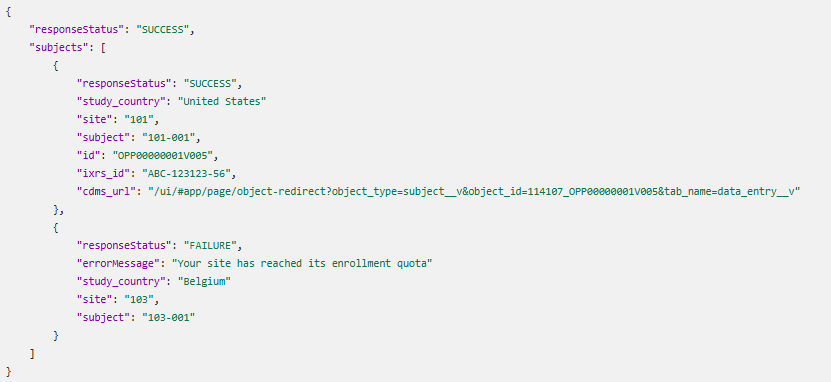
The Create Subject endpoint will not allow the creation of new casebooks if a site quota has been configured and reached.
If the site quota of a site has been reached, the API call will still return SUCCESS while no other issues have been experienced. However, each site for which the enrollment quota was reached will return FAILURE with an error message. This update applies to API version v26.3 and later.
Release Date: October 2, 2026, 26R2.3 Limited Release UPDATE
The Jobs API endpoints, Start Job, Retrieve Study Jobs, Retrieve Job Status, Retrieve Job Output File, and Retrieve Job Log, have been updated to support the export of Audit Trail 2.0 once this functionality is enabled for a Vault and its studies.
The new job type audit_export_2__v allows you to run an Audit Trail 2.0 for studies on an enabled Vault.
To run the Audit Trail 2.0 export job, you must set the required export_scope parameter to all_sites, select_sites, or select_subjects. Optional parameters can be used to filter the entries retrieved with the audit trail export, including, among others, sites, subjects, and date range.
Studies with Audit Trail 2.0 fully enabled will no longer support the legacy audit export jobs: audit_trail_export__v, audit_trail_export_by_site__v, audit_trail_export_by_subject__v.
This update applies to API version v26.3 and later.
Release Date: October 2, 2026, 26R2.3 Limited Release UPDATE
Create Protocol Deviations by Subject ID and Create Protocol Deviations by Event ID (excluding third_party_event) now support the creation of third-party protocol deviations on non-EDC data with the following new parameters:
linked_to_third_party (all API versions; defaulted to false for API versions before 26v3)linked_data_source (from v26.3; required if linked_to_third_party is true)third_party_item (from v26.3; optional)third_party_form (from v26.3; required if third_party_item is provided)third_party_event (from v26.3; required if third_party_form or third_party_item are provided)manual (all API versions; defaulted to true and can only be set to false when linked_to_third_party is true)restricted (from v26.3; defaulted to the restricted value of the object that the PD is raised on and can only be set when linked_to_third_party is true)external_id (from v26.3)From v26.3, Update Protocol Deviations the following new request parameters have to be provided if linked_to_third_party is true for the updated protocol deviation record:
restricted (defaulted to the restricted value of the object that the PD is raised on)third_party_itemthird_party_formthird_party_event (only if PD is raised on a subject)Inactivate Protocol Deviations and Update Protocol Deviations require to have either the id or now global_id stated as request parameter, and global_id is now returned in the response.
Edit Query Details allows updating the query message and/or observed_source_value by study, query id, message id.
Reply With Comment expands the Answer Queries endpoint. The Answer Queries endpoint will be supported for a transition period of at least one year and Veeva will announce the end of support for it in advance.
The new Reply With Comment endpoint will mimic the UI behaviour when selecting the Reply with Comment button
Open Queries, Open Queries by Event ID, Open Queries by Event ID, and Reopen Queries now allows the Vault Owner role to manage queries from any query team.
With the Retrieve Queries endpoint, queries can now be retrieved by Query Team. The new request parameter query_team allows to provide one or more valid query teams (e.g. data_management__v).
Open Queries, Open Queries by Event ID and Open Queries by Item ID now support Quick Queries and Query Teams with the following new and updated request and response parameters, respectively:
query_team (new from v26.3): can only be set, and is required, if the API user belongs to more than one Query Team and must be a valid parameter (e.g. data_management__v) for a Query Team that is assigned to the API user. For Vault Owners, any valid query team must be provided unless it is not a manual query.quick_action_type (new from v26.3): If Quick Queries is enabled for a study, the quick_action_type can be specified with a valid value of missing_value__v or confirm_value__v.observed_source_value (new from v26.3): If Quick Queries is enabled for a study and the API user has the Edit Observed Source Value permission, an observed source value can be specified.message (updated from v26.3): From v26.3, the message parameter remains required if the quick_action_type is not provided or empty. It is not allowed if a quick_action_type is provided.manual (new from v26.3 for query creation by ID): Defaulted to true if omitted.For Close Queries (by ID / Batch) the new message_query_team parameter can be provided, and is required, if Query Team Restrictions are enabled, the API user has more than one Query Team assigned, and has the Close All Queries permission. For Vault Owners, any valid query team must be provided.
DQS API features added in 26.3 only affect DQS API v26.3, unless otherwise specified.
Release Date: October 2, 2026 26R2.3 Limited Release NEW
The new Retrieve Listing Definitions endpoint allows you to retrieve an array of listing definition details by study_name. You can filter the list by type and status. The system only returns listing definitions accessible to the requesting API user.
The new Search Listing Definitions by ID endpoint allows you to retrieve an array of listing definition details by listing ID study_name. The system only returns listing definitions accessible to the requesting API user.
The new Search Listing Packages endpoint allows you to retrieve data packages of specific listings by listing ID study_name. This endpoint returns details for all currently available data packages for the specified listings. DQS will only support Metric packages in v26.3.
The new Download Listing Packages endpoint allows you to retrieve listing packages by the package name or study_name.